
Download WinFTP Pro – Secure FTP Client for Windows, Mac & Android
WinFTP Pro is a powerful, feature-rich FTP client designed for seamless file transfer and website management. Whether you're a web developer, digital marketer, or a beginner managing site updates, WinFTP Pro offers a secure and intuitive solution to upload, download, and manage files across multiple FTP servers. With support for FTP, SFTP, and FTPS protocols, this software ensures your data travels safely through encrypted connections. The free trial allows users to explore its full range of capabilities, including secure login, file preview, automated email notifications, and connection management. Its clean interface caters to both novices and advanced users, making it one of the most versatile FTP tools on the market today.
Why WinFTP Pro Stands Out Among FTP Clients
When it comes to file transfer software, not all FTP clients deliver on both security and usability. WinFTP Pro bridges that gap with a well-balanced design that prioritizes user experience without compromising on advanced functionality. Unlike many basic FTP tools that offer limited protocol support, WinFTP Pro supports FTP, SFTP (SSH), and FTPS (SSL/TLS), ensuring compatibility with nearly every modern hosting provider. This multi-protocol support is essential for professionals who manage multiple servers with varying security standards. The ability to connect via secure FTP with SSL encryption gives users peace of mind—especially when transferring sensitive data like customer information or financial files.
One of the standout features is the built-in file preview, which allows users to view documents, images, and even code files directly within the application. This eliminates the need to download files just to check their content, saving time and bandwidth. For developers, this is a game-changer during debugging or content review. Additionally, the software includes automated email notifications that alert you when file transfers complete or fail—ideal for remote teams or automated deployment workflows. The “Active Directory” feature streamlines file management by letting you organize, rename, delete, or move files directly from the interface, reducing the risk of accidental edits.
WinFTP Pro also excels in connection handling. You can save multiple server profiles with custom settings, making it easy to switch between projects or clients. The drag-and-drop functionality, combined with real-time transfer speed monitoring, ensures a smooth experience even during large file transfers. Whether you're uploading a 500MB video or deploying a full website update, the software maintains stability and performance. For those new to FTP, the guided setup wizard helps configure your first connection in minutes, ensuring a stress-free onboarding process.
Easy Installation, Intuitive Interface & Multi-Platform Support
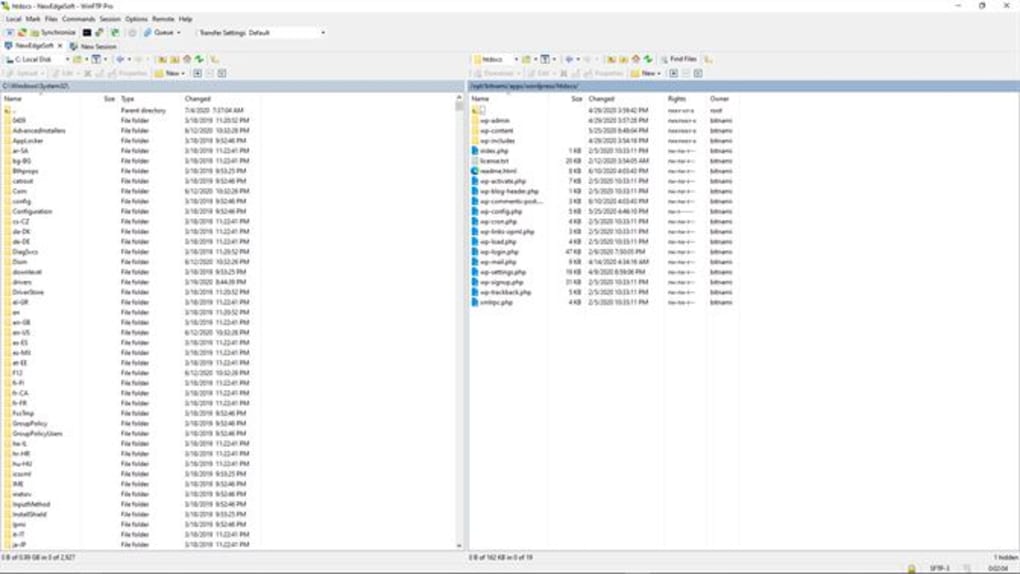
Installing WinFTP Pro is a straightforward process, whether you're using Windows, Mac, Android, or iOS. The installer is lightweight and quick, typically taking less than two minutes to complete. After installation, the application launches with a clean, modern interface that’s easy to navigate. The main dashboard displays your saved connections, transfer queue, and file directories in a well-organized layout. The toolbar includes clearly labeled icons for common actions—upload, download, create folder, and synchronize—making it intuitive even for users with no prior FTP experience.
For beginners, the step-by-step setup wizard walks you through creating your first FTP connection. You’ll enter your server address, username, password, and select the appropriate protocol (FTP, SFTP, or FTPS). The software automatically validates the connection, and if successful, saves the profile for future use. Advanced users will appreciate the customizable interface, including tabbed views, split-screen file browsing, and keyboard shortcuts. You can also set up automatic backups, scheduled transfers, and even integrate with external tools via API.
WinFTP Pro’s cross-platform availability is a major advantage. While the desktop versions for Windows and Mac offer the most robust features, the mobile apps for Android and iOS allow you to monitor transfers, receive notifications, and manage files on the go. This flexibility makes it ideal for freelancers, remote workers, and teams collaborating across time zones. The mobile app syncs seamlessly with your desktop session, so you can start a transfer on your laptop and monitor its progress from your phone. With regular updates, the software remains secure and compatible with the latest operating systems, including Windows 11, macOS Ventura, and Android 14.
Pros, Cons & Key Features at a Glance
- Secure Protocols: Supports FTP, SFTP, and FTPS with SSL/TLS encryption.
- File Preview: View documents, images, and code without downloading.
- Automated Notifications: Email alerts for successful or failed transfers.
- Multi-Platform: Available for Windows, Mac, Android, and iOS.
- Connection Management: Save, organize, and switch between multiple server profiles.
- Drag-and-Drop Transfer: Fast, intuitive file movement between local and remote directories.
- Advanced Options: Synchronize folders, schedule transfers, and set up backups.
- Intuitive UI: Beginner-friendly design with customizable layout.
- Active Directory: Manage files directly—rename, delete, move, and edit.
Pros
- Secure, encrypted file transfers via SSL and SSH
- Perfect balance between beginner-friendly and advanced features
- Real-time transfer monitoring and speed display
- Mobile apps for remote access and notifications
- Regular free updates with bug fixes and security patches
- Excellent customer support with email assistance
Cons
- Full feature set locked behind a paid subscription
- Mobile app lacks full file editing capabilities
- Interface can feel slightly cluttered on smaller screens
- Advanced automation requires some learning curve
- No built-in version control for file history
Frequently Asked Questions (FAQ)
Final Verdict: Is WinFTP Pro Worth Your Time?
After thorough testing and real-world use, WinFTP Pro stands out as one of the most reliable and secure FTP clients available today. Its combination of advanced security protocols, intuitive interface, and multi-platform support makes it a top choice for both beginners and professionals. Whether you're a web designer uploading site files, a developer managing server deployments, or a small business owner updating your website, WinFTP Pro simplifies the process with powerful tools and consistent performance.
The free trial gives you ample time to explore its full capabilities, and the ongoing updates ensure long-term reliability. While the full feature set requires a subscription, the value it delivers—especially in terms of security and ease of use—justifies the investment. For users who prioritize data safety, seamless file management, and cross-device access, WinFTP Pro is an excellent software tool that combines professionalism with accessibility.
Ready to streamline your file transfers? Download WinFTP Pro today and experience secure, fast, and hassle-free FTP management on Windows, Mac, Android, or iOS.







